Gps Speedometer Pro apk Description
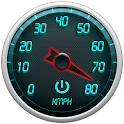
is a highly customizable,auto scalable speedometer with large analogue view,designed for daily use with perfect visual graphics.
a perfect companion whenever you need to know your speed information,direction and altitude, Gps Speedometer Pro can be used efficiently for driving,riding,hiking,cycling,walking,racing etc...
You can keep record of your track or route and create valid GPX files and share with your friends.
Features
No Ads
-Better Performance
-Less Battery Usage
-No Distraction
Graphics
-Customizable Graphics
-Speedometer Hand(3 selections)
-Speedometer Wheel(3 selections)
GPS
-Smart Gps lock
-Quick Gps locking
Scaling and Auto Scale(Speedometer Numbers)
-Auto scale
-Scale can be adjusted
- 0/80 Scale
- 0/160 Scale
- 0/260 Scale
Speed Information
-KMPH,MPH,KNOTS
-Average Speed
-Maximum Speed
-Average and Maxium Speed can be reset
Address Information
-Your actual location address
-Street name
-Post code
Creating Gpx Files
-Gpx files are created automatically and saved in your SDCARD
-You can easily share or delete any file.
-Can be disable/enabled.
-Attach Gpx file and Send Email
Speed Limiter Warning
-Vibration
-Sound Alarm
-Volume Control for sound alarm
-Speed Limiter can be adjusted by touch and rotation around center -wheel as seen in the screenshots.
Compass Information
-Direction
-Degree
Altitude Information
-METRES,FEET
-Altitude
-Altitude correction,It can be adjusted by user ,positive or negative altitude correction values can be added to current altitude value
Font Selection
-Digital Font
-Normal Font
Screen Rotation
-Auto Screen Orientation
APP 2SDcard Support
Device Support
-All screen types are supported
-Small screen
-Normal screen
-Large Screen
-Tablets
Tested Devices
-Htc Hero (Android 2.1)
-HTC HD Desire (Android 2.2)
-Samsung Galaxy S2 (Android 2.3.3)
-SAMSUNG GALAXY TAB (Android 2.2)
User Permissions,Privacy,Security
-Gps Speedometer does not store or collect any personal information
-Please note that requested permissions are required by Ads software used in the application.Gps Speedometer only uses and needs Gps usage permission.If you have any questions regarding permissions please contact our developers.Pro version requires less permissions as it is no ads application.
Quick Guide
Please make sure you are outside of your room or before you enable your gps,
First enable your Gps by pressing the red gps button on the top right.
Once the gps signal is picked or gps is locked, gps button will become blue color which indicates that gps signal is available, in cases when gps signal is lost,gps icon will turn to red,indicating that gps is trying to get lock.
Gpx Files are located at /sdcard/GpsSpeedometerProGpx/ folder.
IF YOU ARE HAVING ANY PROBLEM FOR ANY REASON OR YOU ARE NOT SURE HOW TO RUN THE APPLICATION PLEASE CONTACT OUR DEVELOPERS
linxmap@hotmail.co.uk
Enjoy the new version and have a safe ride...
Thanks
Linxmap Dev Team
Gps Speedometer Pro apk Videos and Images